
CentOS 8 : Download
rev 2019/09/24
| [1] |
This is the configuration Examples for CentOS 8.x that is compatible with Red Hat Enterprise Linux 8.x.
CentOS 8 was released on 24 September 2019.
Download the CentOS 8.5 ISO file for installation from the following site.
⇒ http://isoredirect.centos.org/centos/8.5.2111/isos/x86_64/
On December 2020, CentOS Project announced that they shifts focus to CentOS Stream and CentOS Linux 8, as a rebuild of RHEL 8, will end at the end of 2021.
So CentOS 8 users must migrate to CentOS Stream 8 or other Operating Systems till the end of 2021. It's possible to get ISO file or RPM packages for CentOS Stream from the link below. ⇒ https://www.centos.org/centos-stream/ |
|
CentOS 8 : Create an Installation Disk
|
|
After downloading ISO file of CentOS 8.x, Burn it to a DVD with an burning application to create an installation disk.
If you create it with the function of Windows 7/8/10, refer to follows.
|
|
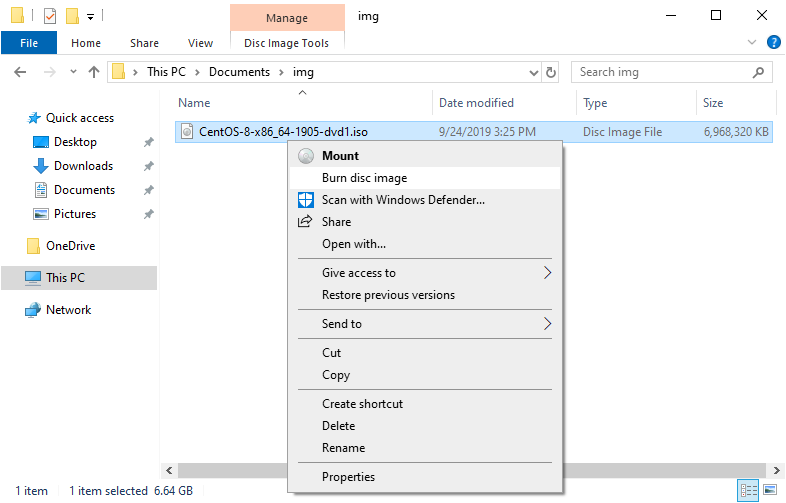
| [2] | Insert an empty DVD media in DVD drive. Next, right-click the ISO image of CentOS 8 and Select [Burn disk image] on the menu. |
|
| [3] | Click [Burn] button and start burning. |

|
| [4] | After finishing burning, eject the disk and proceed to the installation step. |

|